
Domain Registration: A Step-by-Step Guide
Registering a domain name is the first practical step in building your online presence.
Your domain is your unique address on the internet, and securing the right one early is essential.
Domain names are one-of-a-kind, and good ones are in high demand. This updated guide walks you through the entire domain registration process, from searching for the perfect name to renewing your domain when the time comes.
Step 1: Search for Your Domain

Finding the right domain name begins with a search. Use a domain search tool to check whether your preferred name is available. The Westhost domain search tool presents available options similar to your search term. If the .com version of your domain is taken, you will see alternative extensions like .net, .biz, .co, or .uk.
Before settling on a name, do your research. Make sure the name is not trademarked or being used by another company in your industry. A quick online search can help you avoid potential legal issues or brand confusion down the line.
Step 2: Choose Your Domain Extension
The domain extension, or top-level domain (TLD), is the part that comes after your domain name. The .com extension is the most popular and widely recognised, but many other options are available. Country-specific TLDs like .co.uk or .de are excellent choices for local businesses. Industry-specific TLDs like .store, .tech, or .design can also help communicate your business focus.
TIP: If you are unsure which extension to choose, .com is almost always the safest option.
If your preferred .com is unavailable, consider registering an alternative extension and add a descriptive word to your domain name.
Step 3: Proceed to Checkout
Once you have selected the domain or domains you want to register, add them to your shopping cart. You will also have the option to add web hosting, a website builder, or other services to support your new domain. Westhost makes it easy to bundle domain registration with hosting for a complete online setup.
During checkout, you will provide your contact information. Make sure to use a current email address, as this is how your registrar will contact you about renewals and important account notifications. Consider enabling domain privacy protection to keep your personal details hidden from the public WHOIS database.
Step 4: Choose Your Registration Period
You will be asked how long you want to register the domain for, typically from one to ten years.
TIP: Registering for multiple years often reduces the annual cost and protects you from accidental expiration. It also signals stability to search engines, which may offer a small ranking advantage.
If you are unsure about the long term, a two-year registration is a sensible starting point. It balances cost savings with flexibility, giving you time to build your site and establish your brand.
Step 5: Finalise Your Registration
Review your order carefully before completing the purchase.
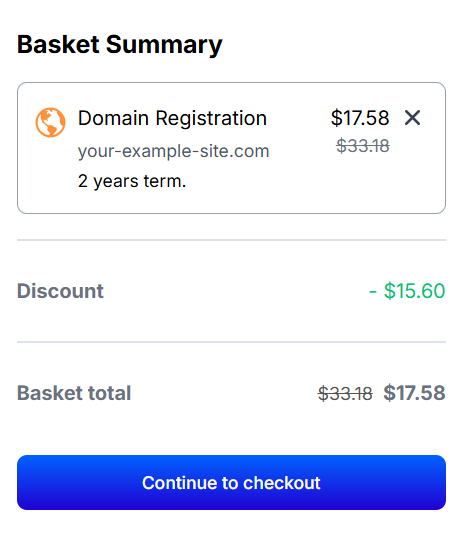
Check That:
- Your domain name is spelled correctly
- That you have chosen the right extension and registration period
- You’ve confirmed your contact details and payment information
Once you confirm the transaction, you will officially become the owner of your domain name for the registration period you selected. You will receive a confirmation email with details about your new domain and instructions for managing it.
Step 6: Manage and Renew Your Domain
After registration, you can manage your domain through your account control panel.
From here, you can:
- Update DNS settings
- Set up email forwarding
- Renew your domain
- Configure privacy settings
Domain renewal is simple. You will receive email reminders before your domain expires. Log into your account, navigate to the domains section, and follow the prompts to renew. Enable automatic renewal to avoid losing your domain due to oversight.
What If My Domain Name Is Taken?
If the domain you want is already registered, you have several options. You can choose a different name or extension, add a relevant word to make it unique, or try to purchase the domain from its current owner.
To contact the owner, perform a WHOIS search to find registration details. If the domain has a holding page or a buy-now offer, you may be able to negotiate a purchase. Be prepared for premium pricing on high-demand domains.
Registering a domain name is a straightforward process, but it pays to be thoughtful.
Choose a name that reflects your brand, register it promptly, and manage it carefully.
Your domain is the foundation of your online identity, so it is worth getting right from the start.
Frequently Asked Questions
Yes, you can register a domain name without purchasing hosting. The domain will be reserved for your use, but you will need hosting to make a website accessible at that address. Westhost offers domain registration as a standalone service.
Most domains become active within a few minutes to 24 hours after registration. In some cases, propagation across the global DNS system can take up to 48 hours. You can typically start configuring your domain settings immediately.
Yes, you can transfer your existing domain to Westhost. The process involves releasing your domain at your current registrar, obtaining an authorisation code, and initiating the transfer through Westhost. The transfer typically takes five to seven days to complete.
If your domain expires, there is usually a grace period during which you can renew it without extra cost. After that, it enters a redemption period where you can still recover it for a fee. Once fully expired and deleted, it becomes available for anyone to register.
Yes, domain registration is a subscription service that must be renewed periodically. You can choose registration periods from one to ten years. Automatic renewal is recommended to prevent accidental loss of your domain.